Outliner IDE Editor
Privacy-First Academic Tooling

The Structured Way to Outline
Academic & Research Papers

Stop fighting document layout formatting. Enforce strict hierarchy, trace logical keyword chaining, paste AI critiques side-by-side, and print beautiful vector PDFs. All 100% offline in your browser.

Start Writing Online (Free) View on GitHub
https://iwas108.github.io/Outliner/dist/
Outliner Workspace Preview

Designed for Rigid Logical Continuity

Outliner goes beyond general text editors. It translates research outlines into strict logical blocks and validates them in real-time.

Structural Constraints

Strict tree validation rules mapping nodes to Section, Topic, Question, and Answer. Ensures every Question is paired with corresponding Answers, keeping your narrative complete.

Keyword Chaining Engine

Checks semantic flow between consecutive outline nodes by tracing shared keywords. Instantly flags gaps or conceptual drift, visually mapping repetitive phrases using color badges.

Human-Directed Layouts

Customize document templates down to the details. Control global and level-specific margins, indentations, line spacings, and heights, outputting clean, native vector PDFs.

Walkthrough

Tour the Outliner IDE Workspace

Explore the workspace interfaces designed to steer research outline formulation from initialization to validation.

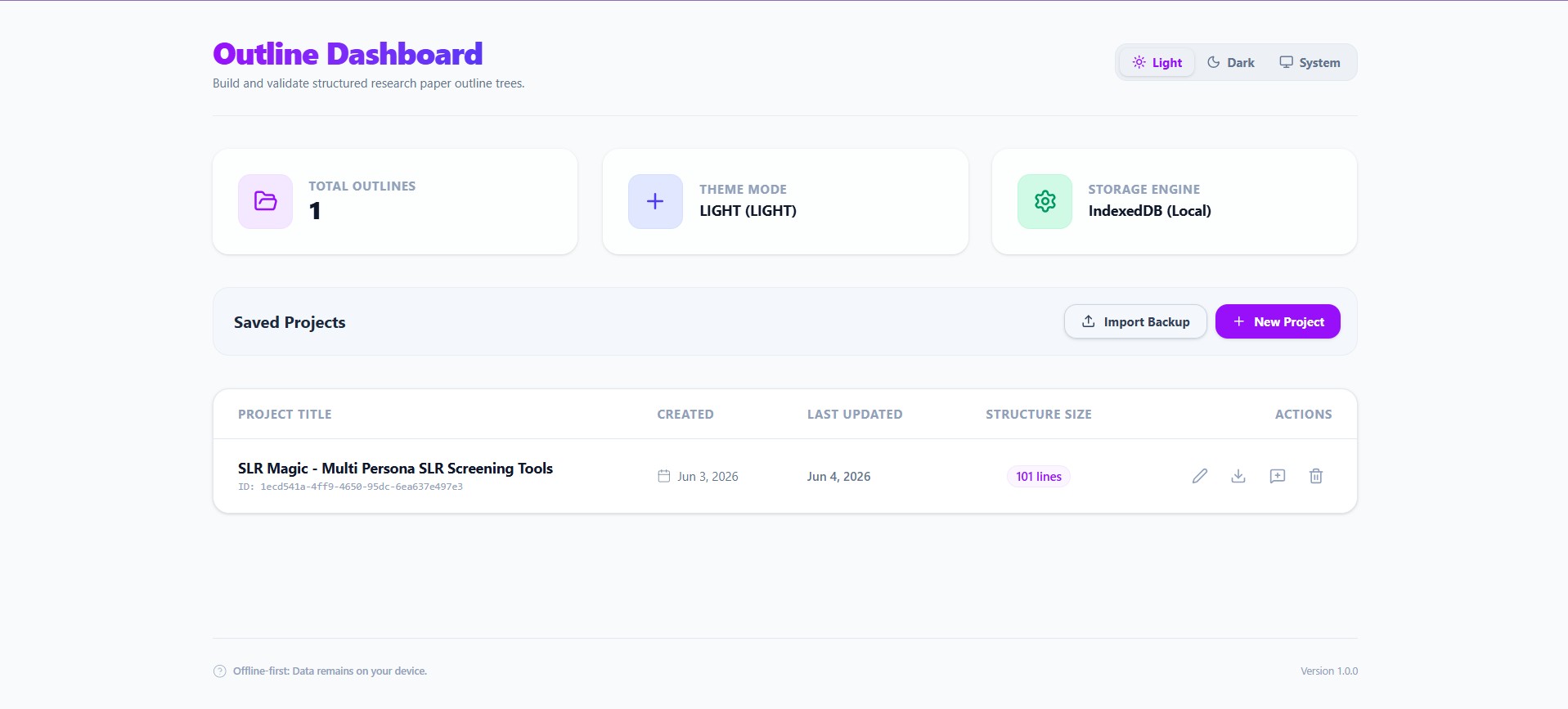
Outliner Project Dashboard

Step 1 Local Project Dashboard

Create new outline documents, review details, and delete drafts. Back up entire projects to standard JSON formats (`.otln-project`) or restore snapshots securely with zero server tracking.

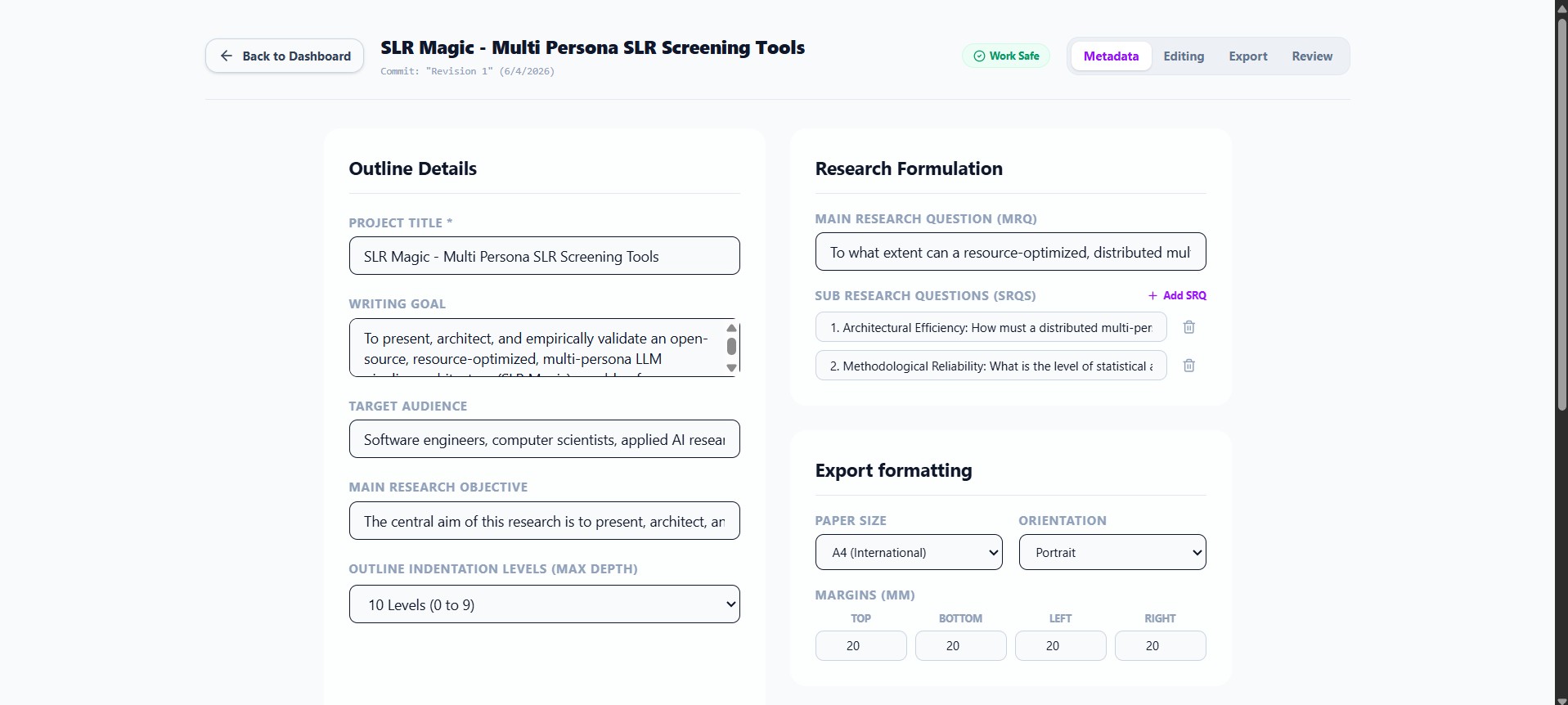
Outliner Research Metadata Setup

Step 2 Research Core Formulations

Configure parameters before outlining. Set writing targets, audience profiles, research objectives, main research questions (MRQs), and a list of sub research questions (SRQs) to anchors focus.

Outliner Nested Text Processor

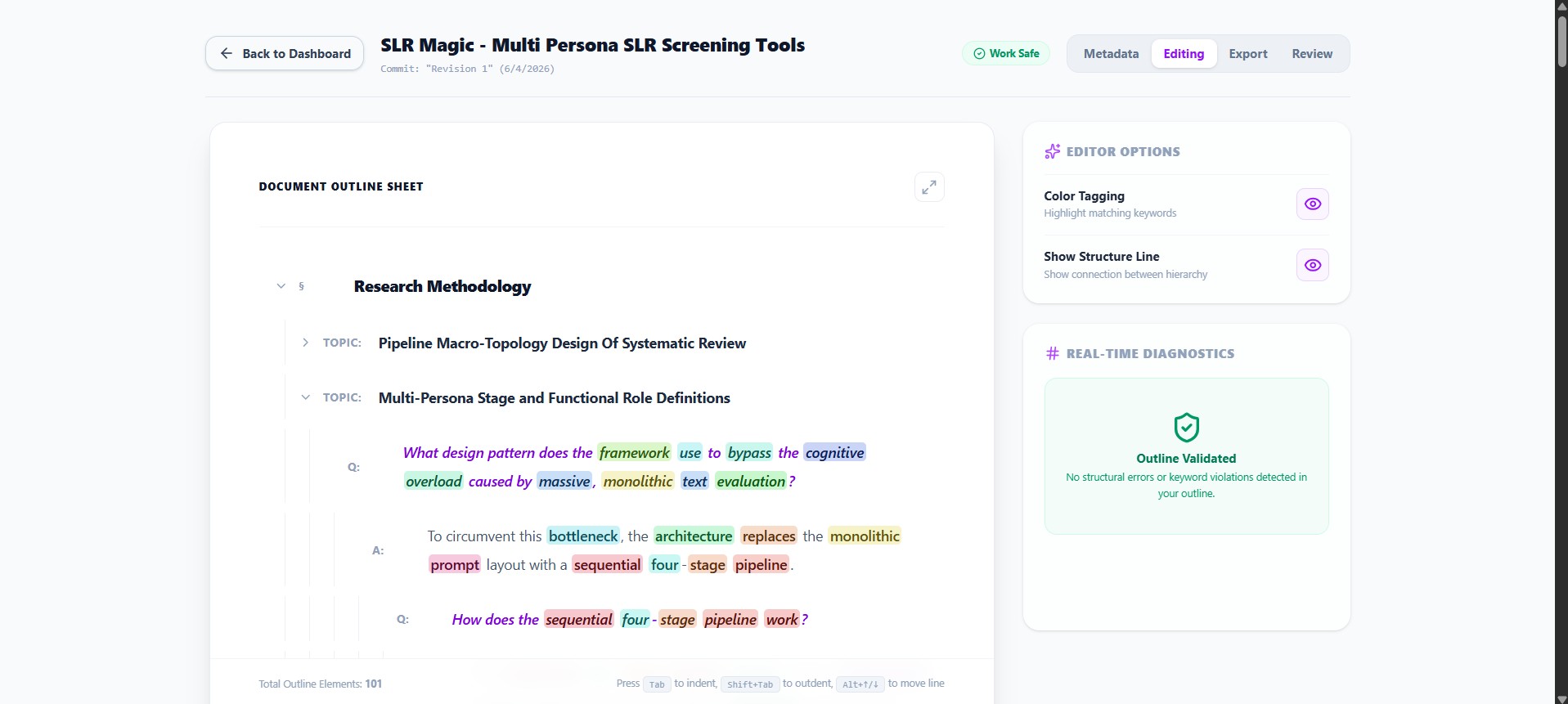
Step 3 Structured Outline Text-Processor

Write outlines using a borderless nested canvas. Use `Tab`/`Shift+Tab` to indent/outdent rows, immediately translating them between Section, Topic, Question, and Answer. Focus elements to overlay active action items.

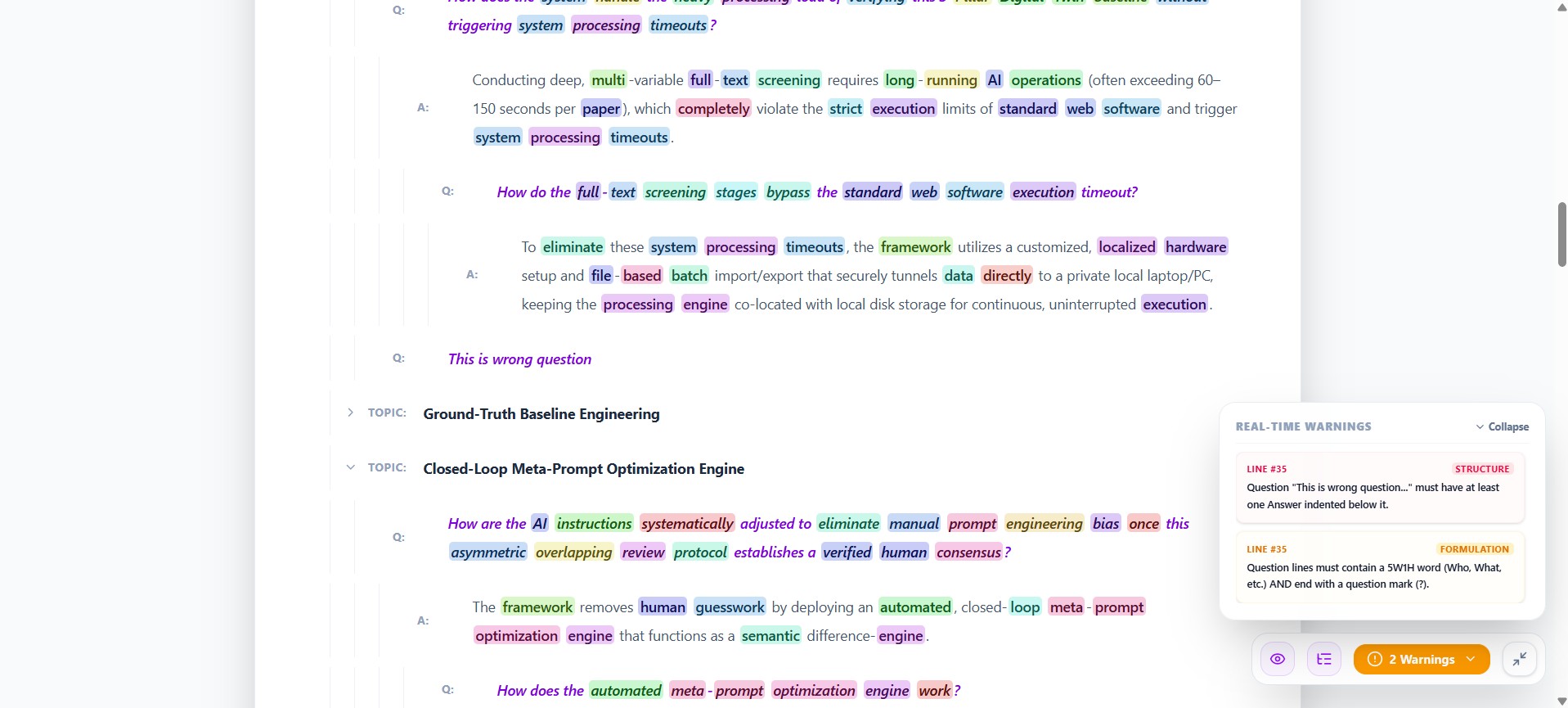
Outliner Fullscreen Maximize View

Step 4 Fullscreen Focus Mode & Warnings Dock

Maximize your outline canvas. Features a bottom control dock to toggle structure guide lines, and a collapsible real-time diagnostics card stream listing structure checks and phrasing issues.

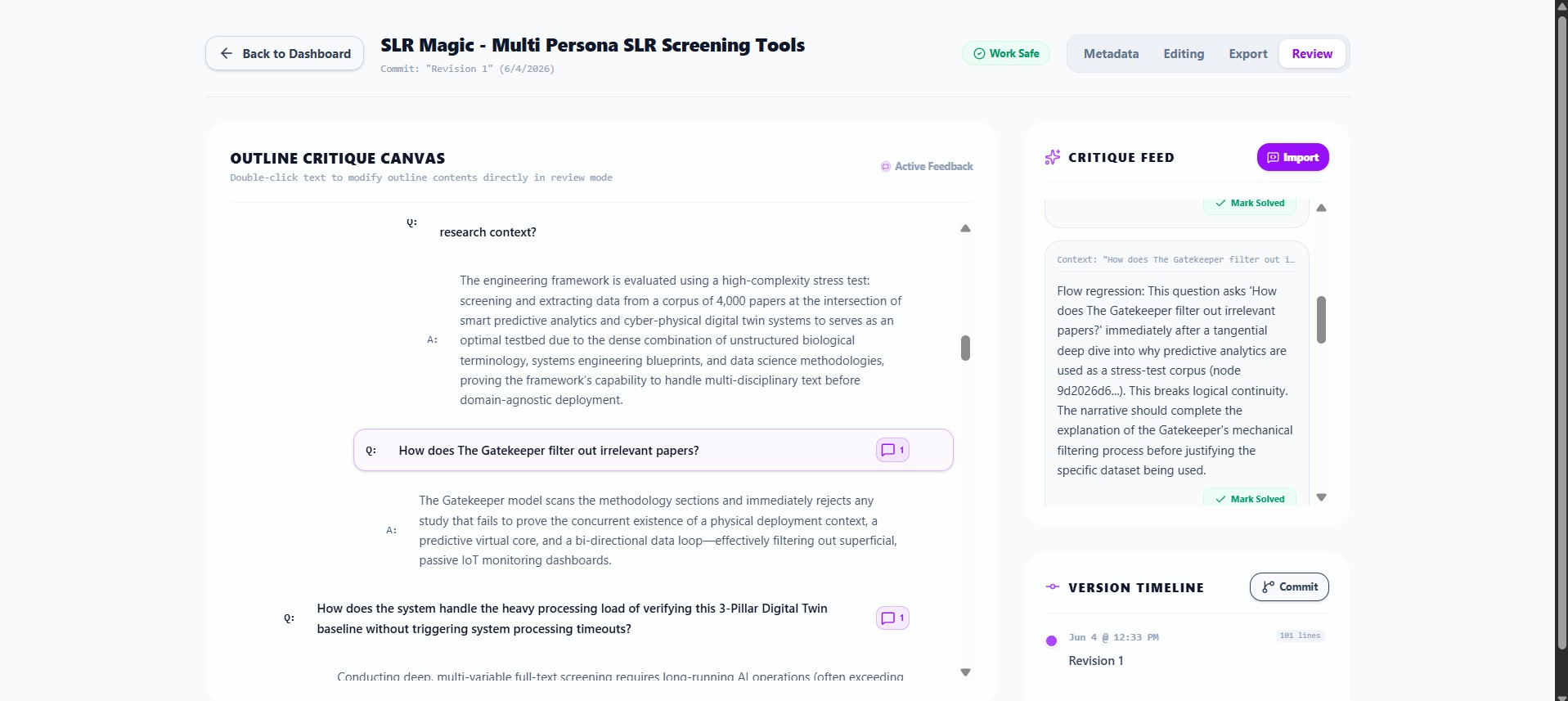
Outliner AI Review Gutter

Step 5 AI Peer Reviews Gutter Board

Export comprehensive prompts, fetch critique from an LLM, and paste feedback directly. Reviews parse into gutter badges alongside nodes, showing active comment cards that can be resolved one-by-one.

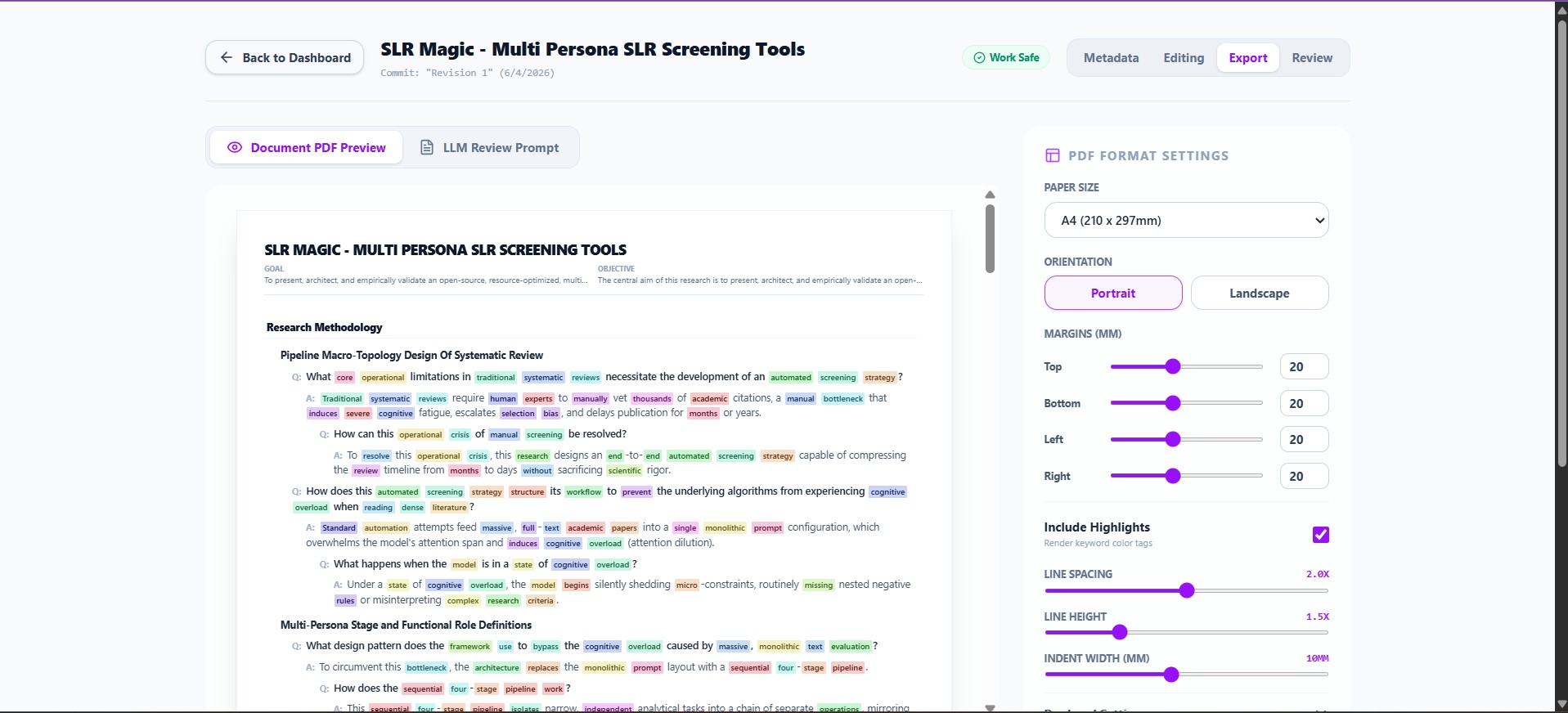
Outliner PDF Customizer Previews

Step 6 PDF Print Configuration Mockups

Symmetrically adjust physical sheet margins, orientations, and dimensions. Override specific levels to toggle colored keyword markers or custom line heights, printing vector PDFs on a live mockup canvas.

Offline-First & FAIR

100% Privacy by Design
Aligned with FAIR Standards

Your ideas belong to you. Outliner implements strict offline-first database mechanics to ensure zero server leakages or cloud tracking, while conforming to the four pillars of open research data.

01. PRIVACY
Zero Cloud Storage: All drafts, commits, config toggles, and critique feeds save directly in your client browser's IndexedDB. No remote tracking, no server logins, and no hidden APIs.
02. OPEN SOURCE
Inspectable MIT Codebase: Auditable under open source licensing. Run it locally, build it offline, copy files, or deploy it on static hosts without vendor locks or subscriptions.

Findable

Every outline, revision checkpoint, and comment cards map unique UUID coordinates in IndexedDB, facilitating exact indexing.

Accessible

Works completely offline. Served as standard responsive static files, guaranteeing immediate availability without internet connections.

Interoperable

Outline models export to standard, beautifully indented `.json` schemas. Project backups save in portable database structures.

Reusable

Easily migrate data. Import and export outlines repeatedly across systems. Re-examine history pipelines without platform locks.

Ready to Structurize Your Outline?

Experience a better way to plan academic research papers. Define objective questions, track keyword chaining, copy LLM reviews, and print clean layouts.

Launch the Outliner Editor

Launch Outliner Workspace

Outliner is a privacy-first, offline-ready academic writing IDE. Choose how you want to work.

Web Browser Version

Zero Install
  • Runs directly in your browser tab without installing any software.
  • Data is saved inside the browser's local sandbox database (IndexedDB).
  • ⚠️ Caution: Clearing browser cache, cleaning site history, or private browsing may erase your IndexedDB storage.
Start Web Editor (Free)

Native Windows App

Portable Executable
  • Double-click to launch on your desktop. Works fully offline without an internet connection.
  • Data is saved inside the local user profile's standalone IndexedDB database wrapper.
  • Advantage: Completely unaffected by browser history clears, cache sweeps, or website data resets.
Download Windows App (.exe)
Privacy-First Storage & Data Backups

Outliner does NOT run any remote database servers and never uploads your manuscripts to the cloud. Your research is stored strictly on your local hard drive. Because of this, it is highly recommended to download a backup file (.otln-project or .json) of your work frequently. If your device breaks or browser storage is wiped, backups are the only way to recover your data.

Latest Application Features

1. PDF & Word Document Export

Export publication-ready vector PDFs or clean Microsoft Word documents (.docx) styled with academic metadata blocks. Margins, line-heights, and spacing can be adjusted globally or overridden per hierarchy level.

2. Async Grammar Checker

Features a real-time diagnostics checker running in an off-thread Web Worker. Scans for duplicate words, missing capitalization, and passive voice patterns without interrupting typing or freezing the user interface.

3. AI Reviewer with Personas

Import and review structured feedback from LLMs directly side-by-side in your workspace. Select from specialized reviewer personas (such as Logical Flow Auditor, Methodology Critic, or tone reviewers) to target different feedback goals.